Graphically creating and editing cross sections
The floating palette (Workspace > Tools > Editing Tools at the right of the Strip) contains the tools to create and edit cross sections in the CoView.
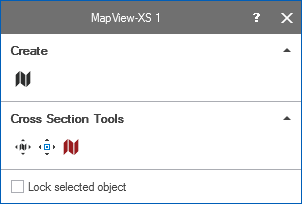
The editing tools for cross sections. click to enlarge
The editing tools for the cross sections are distributed in two sections. The 'Create' section allows you to create new cross section. The 'Cross Section Tools' section allows you to further edit your cross sections, such as moving or deleting cross sections.
To create a cross section:
- Visualize the map that you want add a cross section to in the CoView.
- Open the floating palette via Workspace > Tools > Editing Tools (Shift + F1)
- Select the Create Cross Section tool
 .
. - A Settings section is opened, where a default name for the cross section is already filled in. The name field is editable, you can change the name if you want.
- In the Settings section, a default value of 200 m is already filled in for the wellbore projection distance. This field is editable, and you can change the value if you want. When you use the tools in the CoView, this wellbore projection distance is visualized as a (transparent) gray box.
- Click on the map at the location(s) where you want to add the cross section vertices.
- When you are done, double click to end the cross section.
- Click on the Create Cross Section tool again to deactivate it.
- The cross section is stored in the JewelExplorer under the Cross Sections folder.
To edit a cross section:
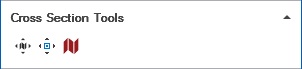
The cross section tools on the floating palette click to enlarge
Select one of the available tools: Move Cross Section  , Move Cross Section Node
  , Delete Cross Section
  . Upon selection all the cross sections that you have visualized on the map are highlighted.
Move Cross Section Select the move tool and then select the cross section you want to move. Left mouse click on the cross section and drag it to another location on the map.
Move Cross Section Node Select the move node tool and then select the cross section node you want to move. Left mouse click on the selected node and drag it to another location on the map.
 Delete Cross Section Select the delete tool and then left mouse click on the cross section that you want to delete. Confirm the delete action on the dialog that opens.